
Fibre Box Lights All Green but No Internet?
This happened to us on a Sunday morning. The internet was gone. Nothing loaded on any device in the house.
So you do what everyone does. You go and look at the boxes. The fibre box on the wall (the ONT, the little box the fibre cable plugs into) looked perfect: power, broadband, service and ethernet all green.
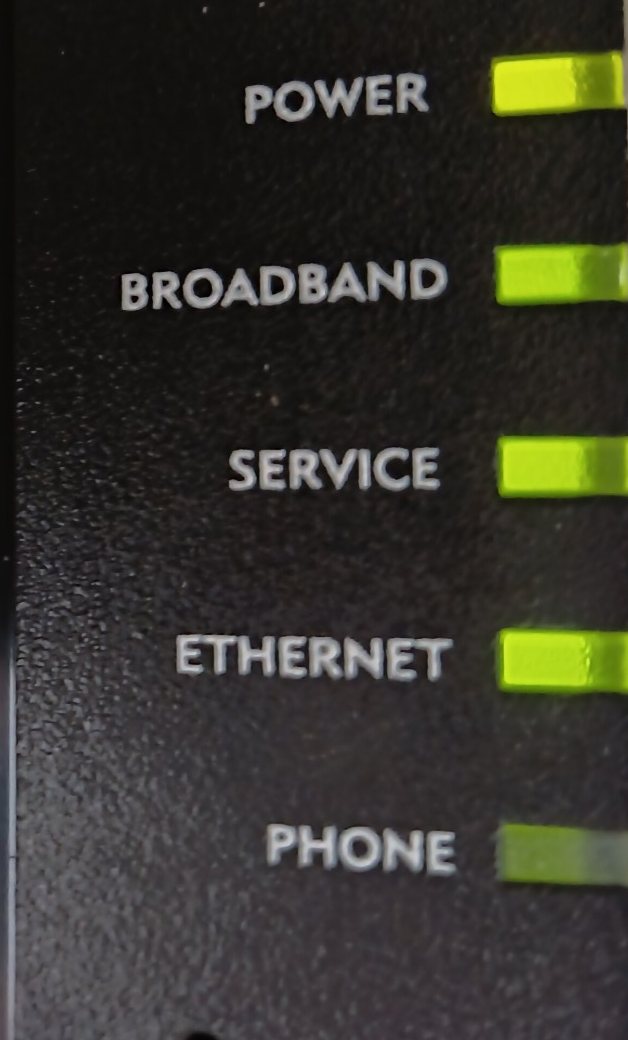
The fibre box during the outage. Every light that matters is green.
The router was a different story. It had a red light, and its page kept asking for the ISP login details, as if they'd been typed in wrong. They hadn't been touched in months.
That's the moment most people start unplugging things. If the fibre box says everything is fine, the fault must be the router, a cable, or the network switch if you have one. So you restart the router, swap the cables, power-cycle the switch, dig out the login details, and an hour later you're no closer.
What the lights on the fibre box actually tell you
The lights only tell you about the box's own little piece of the path:
- Power - it has power.
- Broadband (on some boxes PON or Fibre) - the light coming down the fibre is reaching the box. If this one is off or red, the problem is the fibre itself: the cable, a bent connector, or a cut in the street.
- Service - the box has been recognised by the provider's equipment at the other end of the fibre.
- Ethernet - your router is plugged into the box and talking to it.
What none of those lights can see is anything further in. The provider's equipment behind the fibre still has to log your connection in and send your traffic out to the internet. If that part fails, the fibre box has nothing to complain about. Its own piece is working, so the lights stay green.
That's also why the router asks for the login details again. The router logs in to your ISP every time it connects. When the ISP's side stops answering, many routers show it as a login failure, even though your details are fine.
So all green on the fibre box, plus a router that can't log in, very often points past both of your boxes, to your ISP. It can still be the router, which is the problem. From the lights alone you can't tell which.
How Copper Goose told us in seconds
Copper Goose Network Monitor sits in the Windows tray and keeps checking two things separately: whether your own router is answering, and whether anything past it is.
Our router kept answering the whole time. Nothing beyond it did. So instead of "no internet" and a shrug, the panel said what that combination means:
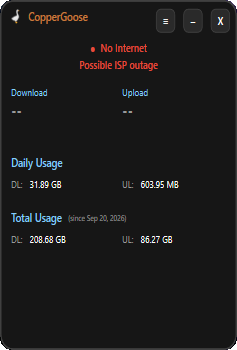
What the app said during the outage.
"Possible ISP outage." It wasn't the router, a cable or a switch, and it wasn't anything in the house. That was enough to stop fiddling and log the fault with the ISP.
Why the green lights would have cost us more time with the ISP
Our ISP logs faults through an automated WhatsApp chat, and one of the first things it asks for is a photo of the fibre box. A photo with every light green tells their system that your side is fine up to the box, so the next steps it hands you are about your own equipment: restart the router, check the cables, try again. You can lose another hour going round that loop before anyone looks at their end.
Knowing what the app said changes that conversation. You can tell them plainly: the router was answering the whole time, nothing past it was, and the fibre box is green. That's their side, not yours, and it gets the fault logged as an outage instead of a home-network problem.
It also helps that you can be sure. In many places the company you pay for internet isn't the company that runs the fibre in your street. Your ISP sells the package and sends the bill, while a separate network operator owns the fibre and the equipment behind it. When that network has a fault, your ISP often hasn't heard about it yet, and "we have no known issues in your area" is an honest answer that's still wrong.
When it came back, the app said:
"Back online - Down for 2 h 47 min. The fault was past your router (your ISP)."
Then get credit for the downtime
Almost three hours without internet is time you paid for and didn't get. Copper Goose had already written the outage into History, with the date, the time and how long it lasted, marked as being on the ISP's side.
In History, "Report for ISP…" turns the last 30 days into a plain list you can send them, ready to go with the call. It shows when you were down, for how long, and that your router was working each time. Many ISPs have a process for crediting outages, but they want the times, and now you have them. We wrote about how to ask in How to Get a Refund From Your ISP for Outages.
Copper Goose Network Monitor is a small Windows app that watches your connection all day and tells you in plain English whether it's your Wi-Fi, your router, a cable, the fibre box or your ISP. Free two-week trial, then $14 once.
Copper Goose Network Monitor tells you whether a slowdown is your local network or your ISP, with real-time speeds and usage tracking.
DownloadFree two-week trial, then 14 USD one-time (excl. tax), with a 7-day money-back guarantee.